My AI Development Setup
tl;dr
- Supacode
- Pi
- Plannotator
- Zed
- revdiff
- Ollama Cloud
- Primarily with glm-5.3-flash
My Workflow
1. Supacode
I start with supacode, it's basically the ghostty terminal but with some extra UI for creating and managing git worktrees. With AI I feel I am switching tasks a lot more frequently and worktrees make it easier to isolate work than regular branches do, especially on projects that use sqlite, since each worktree has its own database.
I use this .git/hooks/post-checkout script for initialising projects on new worktrees, but supacode also has support for defining setup and teardown scripts:
#!/bin/bash

base_repo_git=$(git rev-parse --path-format=absolute --git-common-dir)
base_repo=$(dirname "$base_repo_git")

# This check only runs on worktree creation
if [[ "$1" == "0000000000000000000000000000000000000000" ]]; then
    cp "$base_repo/config/master.key" "$(pwd)/config/master.key"
    cp "$base_repo/.envrc" "$(pwd)/.envrc"

    mise trust
    direnv allow

    bundle install
    npm install

    rails db:migrate
    rails db:seed
fi
2. pi
I am currently using pi as my agent harness. So far I've kept things pretty light, I haven't noticed the need for any plugins except for pi-mcp-adapter (I rely on the rollbar MCP) and @gotgenes/pi-permission-system. The permission system allows me to control which commands (and on which paths) pi can run without approval. By default everything asks for approval and I am building up the list of safe commands and paths that can auto-approve. You can see my config file here.
I mainly use the glm-5.3-flash model, it's fast, cheap and pretty reliable. It's not as good as Sol or Fable but it's good enough for most work. I will often use Sol or Fable to review the code generated by glm-5.3-flash, using my local-review skill.
3. Plannotator
Plannotator is the real star and is the missing piece I've been waiting for.
My workflow is to ask the agent to make a plan and write it to PLAN.md, I can then use /plannotator-annotate PLAN.md to open the plan in plannotator where I can comment on it in a Google Docs-style interface:
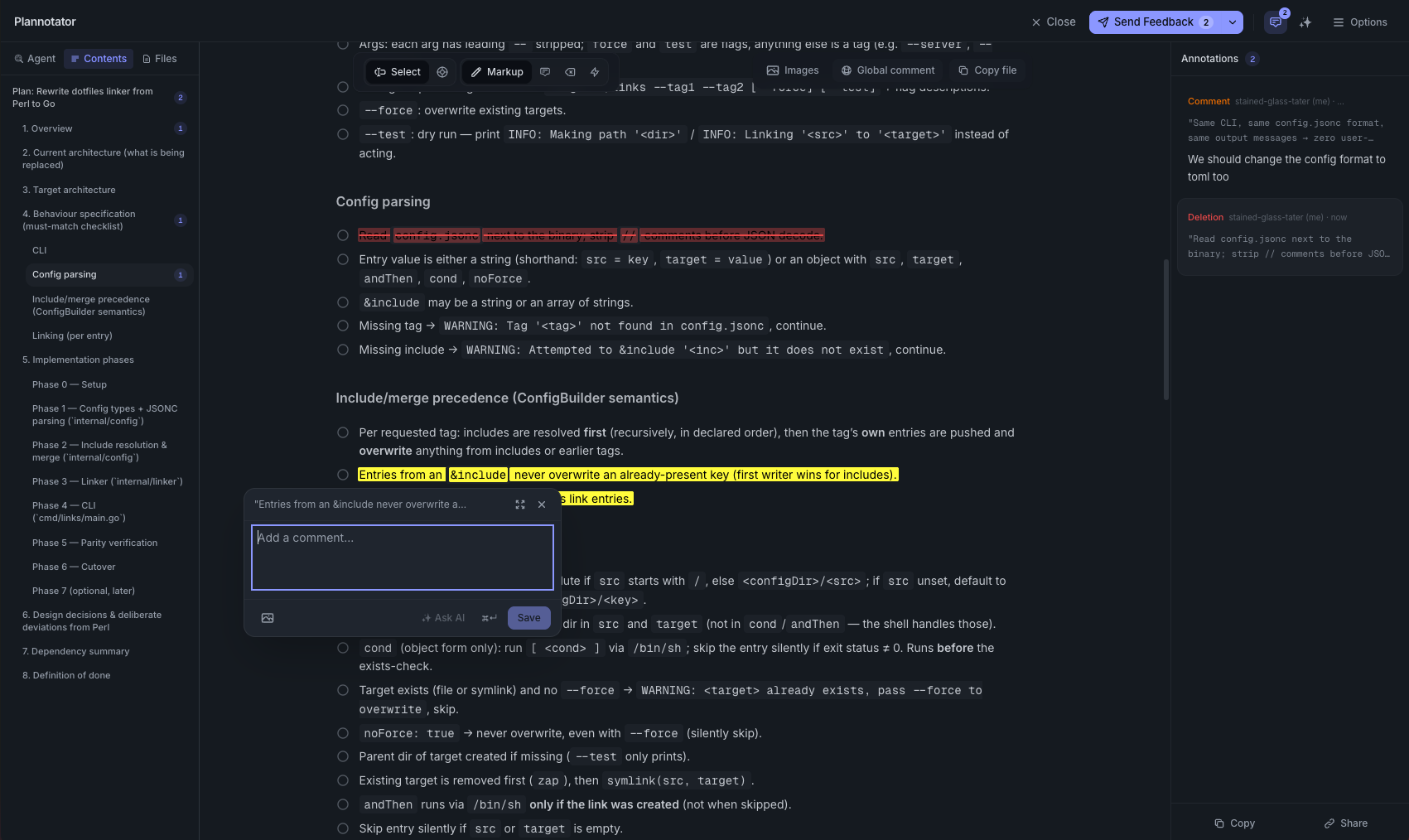
After I submit, the feedback is automatically sent back to the agent and it will make a new plan. Once I'm happy with the plan I tell the agent to get started. After the changes are complete I run /plannotator-review to review the changes in plannotator, where I can ask questions and provide feedback in a GitHub PR-style interface:
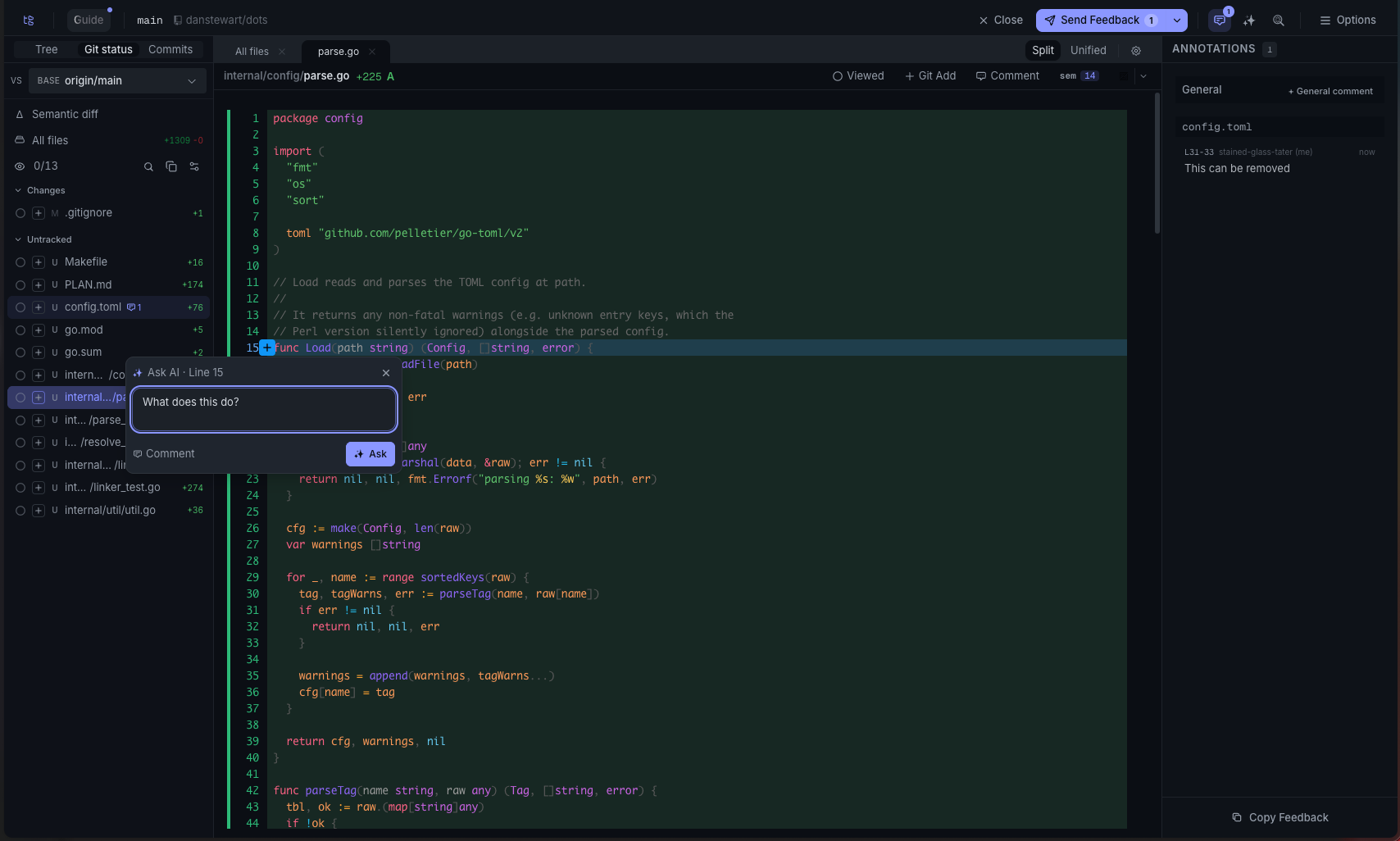
The questions get answered live but the feedback is sent after clicking "Send Feedback" where it is again automatically sent back to the agent and it works on the changes.
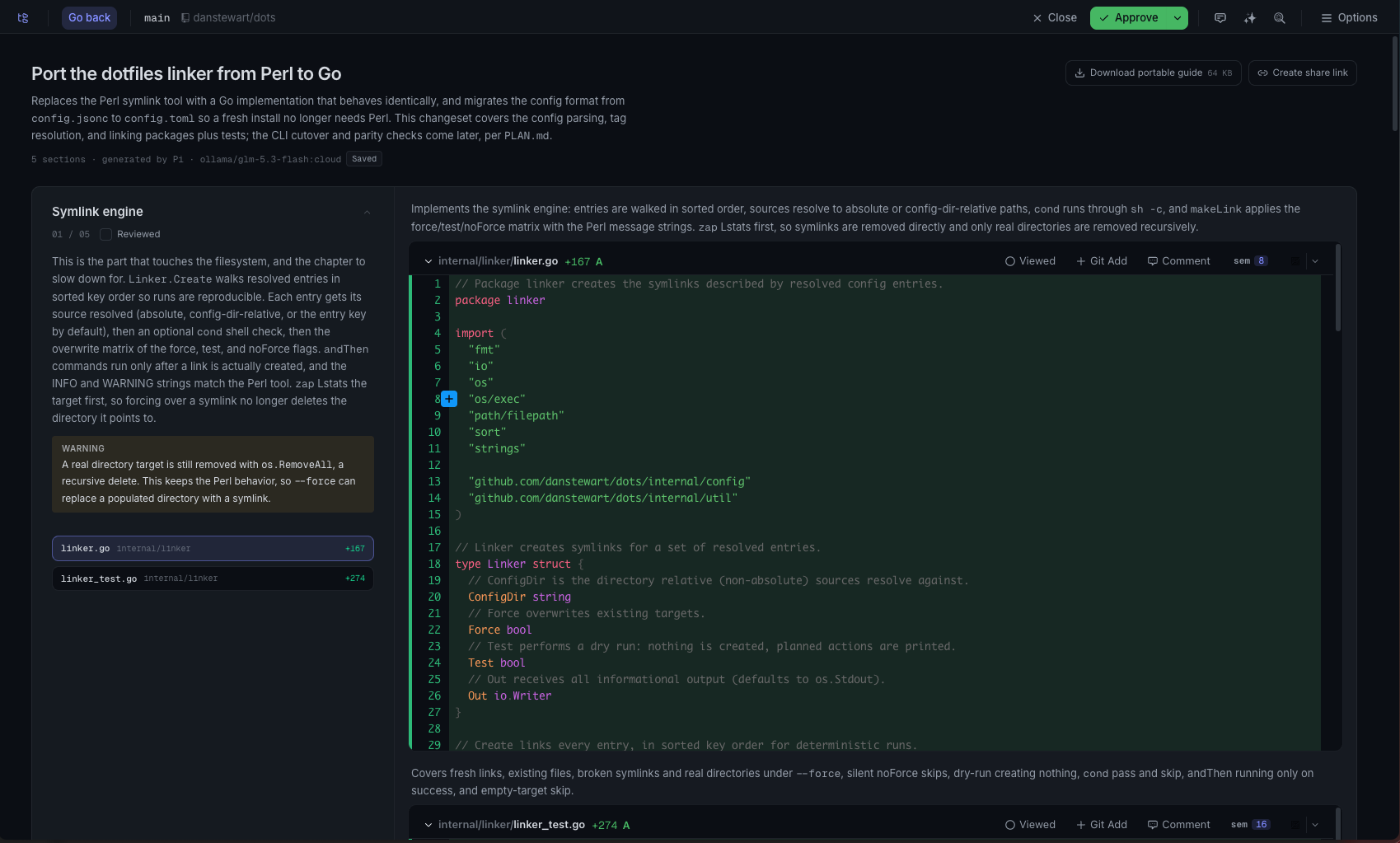
Plannotator also has a "Guided Review" function which splits the changes up into chunks and adds some extra context for each, this can be really helpful for larger changes:
4. Zed
If I want to drop in and edit some code myself (which is becoming increasingly rare) I will use zed. I also use revdiff as my terminal diff tool.
Other tools I've tried
- maki - Maki is another lightweight harness, I really like it, I haven't uninstalled it yet but I have found pi to be consistently quicker
- herdr - It's a bit like supacode but inside the terminal, which is nice if you aren't using ghostty, I just prefer the UX of supacode
- omp - It's pi but with batteries included, it just felt a bit heavy to me and does a lot more than I need
- orca - Orca is kind of a command centre for different harnesses and handles worktrees too, it's pretty impressive, but again I felt like it did too much, I preferred the simplicity of supacode and pi
I'm happy with this current setup, it really makes the AI agent feel more like a coworker, which is a bit weird but is a much nicer experience than copying and pasting things all over the place to get tools to link up. I think the biggest issue I have is reviewing and understanding all this AI-generated code to have the confidence to ship it, but plannotator is the best way I've found so far.